fiber
Loading...
Searching...
No Matches
fiber::OStream Class Referenceabstract

Abstract class for an output character stream that offers string and number formating. More...

#include <OStream.hpp>

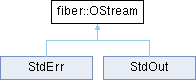
Inheritance diagram for fiber::OStream:
StdErr StdOut

Public Member Functions

virtual ~OStream ()
 
virtual void put (char c)=0
 Overload this method to write a character to the stream.
 
virtual void put (char c, int count)
 Writes a character to the stream count many times.
 
virtual void flush ()=0
 Overload this method to force flush the buffer.
 
virtual void write (const char *str, size_t len)
 Writes a string to the stream.
 
virtual void write (const char *str)
 Writes a string to the stream.
 
virtual void newl ()
 Prints a new line character. Compared to endl(), this function does not call flush()
 
virtual void endl ()
 Prints a new line character followed by a call flush()
 

Detailed Description

Abstract class for an output character stream that offers string and number formating.

Do you want to implement your own output stream? For example with a custom USART driver? But the standard output stream std::ostream or {fmt} fmt::format_to() use too much FLASH memory? This streaming interface serves as a minimal implementation for streams with a small footprint. Derive from this class and use its number and string formatings that let you do stuff like:

stream << "this is an int: " << 42 << fiber::newl;
stream << "this is a float: " << 42.32 << fiber::newl;
stream << "this is an bool: " << true << fiber::endl;
void endl(OStream &stream)
Writes a new line character to the stream followed by a call to OStream::flush()
Definition OStream.hpp:198
void newl(OStream &stream)
Writes a new line character to the stream.
Definition OStream.hpp:183

Virtual methods that the user has to overload:

virtual void put(char c);
virtual void flush();
virtual void flush()=0
Overload this method to force flush the buffer.
virtual void put(char c)=0
Overload this method to write a character to the stream.

The other methods will use them but it is best to also overload:

virtual void write(const char* str, size_t len)
virtual void write(const char *str, size_t len)
Writes a string to the stream.
Definition OStream.cpp:32

as well for best performance.
Constructor & Destructor Documentation

◆ ~OStream()

virtual fiber::OStream::~OStream ( )
inlinevirtual

Member Function Documentation

◆ endl()

void fiber::OStream::endl ( )
virtual

Prints a new line character followed by a call flush()

◆ flush()

virtual void fiber::OStream::flush ( )
pure virtual

Overload this method to force flush the buffer.

Has to be overloaded by the user!

Implemented in StdErr, and StdOut.

◆ newl()

void fiber::OStream::newl ( )
virtual

Prints a new line character. Compared to endl(), this function does not call flush()

◆ put() [1/2]

virtual void fiber::OStream::put ( char c)
pure virtual

Overload this method to write a character to the stream.

Has to be overloaded by the user!

Parameters
cA character that should be written to the stream

Implemented in StdErr, and StdOut.

◆ put() [2/2]

void fiber::OStream::put ( char c,
int count )
virtual

Writes a character to the stream count many times.

Will only place characters if count is positive

Parameters
cA character that should be written to the stream
countthe number of times that character should be written to the stream

◆ write() [1/2]

void fiber::OStream::write ( const char * str)
virtual

Writes a string to the stream.

If not implemented by the user, will use the put() method to write to the stream

Parameters
stra pointer to the start of a zero-terminated string

◆ write() [2/2]

void fiber::OStream::write ( const char * str,
size_t len )
virtual

Writes a string to the stream.

If not implemented by the user, will use the put() method to write to the stream

Parameters
stra pointer to the start of the string
lenthe length of the string, aka. the number of characters that should be read from the string

Reimplemented in StdErr, and StdOut.


The documentation for this class was generated from the following files: